How to Track Champions in Your CRM

Every sales team talks about the importance of champions. Very few actually track them.
The typical approach is informal: a rep knows who their champion is, keeps it in their head, and maybe mentions it on a forecast call. When the deal closes, that context disappears. When the champion changes jobs six months later, nobody notices.
This is expensive. Champions convert at 3x the rate of cold outreach when they move to a new company. New decision-makers spend 70% of their budget in their first 100 days.
But you can only capitalize on that if you know who your champions are, where they are now, and when something changes.
Who Qualifies as a Champion
Before you build anything in your CRM, get clear on what qualifies someone as a champion. Without a definition, reps will either tag everyone or tag nobody.
A champion is not the same as a contact or a stakeholder. A champion actively advocated for your solution. They pushed for you internally, helped navigate objections, and influenced the buying decision, even if they didn't sign the contract.
Categories that typically qualify:
- Deal champions: The person who drove the buying process on a closed-won deal. May not have been the signer, but was the internal seller.
- Power users: People who adopted your product deeply — ran training, built workflows, submitted feature requests.
- Executive sponsors: Senior leaders who greenlit the purchase or created budget for it.
- Active evaluators on lost deals: Someone who loved your product but lost to budget, timing, or internal politics. The deal didn't close, but they didn't stop believing in your solution.
The key distinction is intent. A champion actively worked to make something happen with your product. A contact just happened to be on a call.
Setting Up Champion Tracking in Salesforce
Salesforce doesn't have a native "Champion" object. You need to build the tracking layer yourself using contact fields and opportunity contact roles. No developer required.
Custom Fields on the Contact Object
Create these fields:
- Champion Status — Picklist: Active Champion, Former Champion, Potential Champion. This is your primary identifier. "Active" = currently at an account where they champion your product. "Former" = moved on or account churned. "Potential" = showed champion behavior but deal hasn't closed.
- Champion Type — Multi-select picklist: Deal Champion, Executive Sponsor, Power User, Internal Advocate, Active Evaluator. One contact can qualify under multiple types.
- Champion Since — Date field. When they were first tagged.
- Champion Notes — Long text. What specifically makes them a champion. "Led the Q2 eval, convinced the CFO to approve budget, ran training for 30 users." This context is gold when you re-engage them later.
- Original Account — Lookup to Account. Maintains the link to where the relationship started, even after the champion moves.
- Champion Owner — Lookup to User. The rep or CSM who owns the relationship (may differ from the current account owner).
Customize Opportunity Contact Roles
Salesforce ships with default contact roles (Decision Maker, Evaluator, Influencer) but "Champion" isn't one of them.
Go to Setup > Contact Roles on Opportunities > add "Champion" to the picklist. A clean list looks like: Champion, Decision Maker, Economic Buyer, Technical Evaluator, End User, Legal, Procurement, Blocker.
Having "Champion" as an explicit role means reps tag champions during the sales process, not retroactively. This data flows into reporting so you can compare win rates for deals with a tagged champion vs. deals without one.
Build a Champion List View and Reports
Create a Contact list view filtered to Champion Status = Active or Former. Columns: Name, Title, Account, Champion Type, Champion Since, Last Activity Date.
Then build two reports:
- Champion distribution: Contact report grouped by Champion Type. Tells you how many champions you have and what types. If 90% are "Deal Champion" and almost none are "Power User," you have a tagging gap or a CS alignment problem.
- Champion influence on win rate: Opportunity report cross-referenced with Contact Role = Champion. Compare win rates for champion-tagged deals vs. non-tagged. Most teams find a 2-3x difference, which justifies the entire program.
Setting Up Champion Tracking in HubSpot
Same concept, different mechanics. Create these Contact properties under a group called "Champion Tracking":
- Champion Status — Dropdown: Active Champion, Former Champion, Potential Champion
- Champion Type — Multiple checkboxes: Deal Champion, Executive Sponsor, Power User, Internal Advocate, Active Evaluator
- Champion Since — Date picker
- Champion Notes — Multi-line text
- Original Company — Single-line text (HubSpot doesn't support cross-object lookups as cleanly, so store the company name as text)
For deal-level tagging, use the "Contact's role" dropdown on deal associations to indicate "Champion," or create a deal-level property called "Champion Contact" as a contact lookup.
Build an Active List filtered to Champion Status = Active or Former. This auto-updates as you tag new champions.
Getting Reps to Actually Tag Champions
The CRM setup is the easy part. Adoption is where champion tracking dies.
Two principles that help:
Make tagging part of existing deal processes. The best moment to tag a champion is during deal review. When a manager asks "who's your champion on this deal?" the answer should go into the CRM right then — not stay in the rep's head. No separate workflow, no extra admin task.
Give reps a reason to care. Show them the data: deals with tagged champions close at 2-3x the rate. And connect tagging to a direct benefit — when a tagged champion changes jobs, the rep gets alerted with a warm pipeline opportunity instead of finding out months later on LinkedIn.
For post-sale champion identification, CS teams are the right owners. They know the power users, the executive sponsors, the internal advocates. Build a quarterly review where CS tags new champions across their book of business.
The Job Change Problem
Tagging champions is step one. The real value is what you do when something changes.
About 20% of CRM contacts change jobs every year. CRM data decays at roughly 30% annually.
Salesforce and HubSpot don't natively detect job changes. By the time a rep spots a champion's move (if they spot it at all), weeks have passed and the window is closing.
Manually checking LinkedIn for each tagged champion doesn't scale beyond a few dozen contacts.
Some teams use dedicated champion job change tools (UserGems, Champify, Sales Navigator) to monitor job changes. These work, but they're focused on a single signal. Job changes aren't the only trigger that matters.
Beyond Job Changes
A champion who stays at the same company but gets promoted now has more budget authority. A VP who championed your product as a Director can push it into adjacent departments.
A champion on a deal you lost to a competitor is still valuable when:
- The competitor's contract approaches renewal
- The competitor has a public service issue
- New leadership joins and resets priorities
- The champion re-engages with your content or visits your pricing page
These signals matter as much as job changes, but almost no team tracks them. They require monitoring CRM activity, website visits, social engagement, and competitive intelligence.
This is where champion tracking connects to your broader closed-lost revival strategy. The champions on your lost deals are some of the most valuable contacts in your CRM, but only if you detect when their circumstances change.
Making Champion Tracking Automatic
The CRM setup in this guide gives you the foundation: structured data about who your champions are, why they qualify, and where the relationship started.
What it doesn't give you is the monitoring layer. Knowing that Jane Doe is a champion doesn't help if nobody notices when she gets promoted, changes companies, or starts engaging with your content again.
Letterdrop closes this gap.
We pull in deal data, call transcripts, and stakeholder history to understand not just who your champions are, but champion job changes and why they championed you.
Then we monitor for changes across the full range of signals:
- Job changes and promotions
- Budget cycle resets
- Competitor contract renewals
- Website re-engagement
- Social activity signaling renewed interest
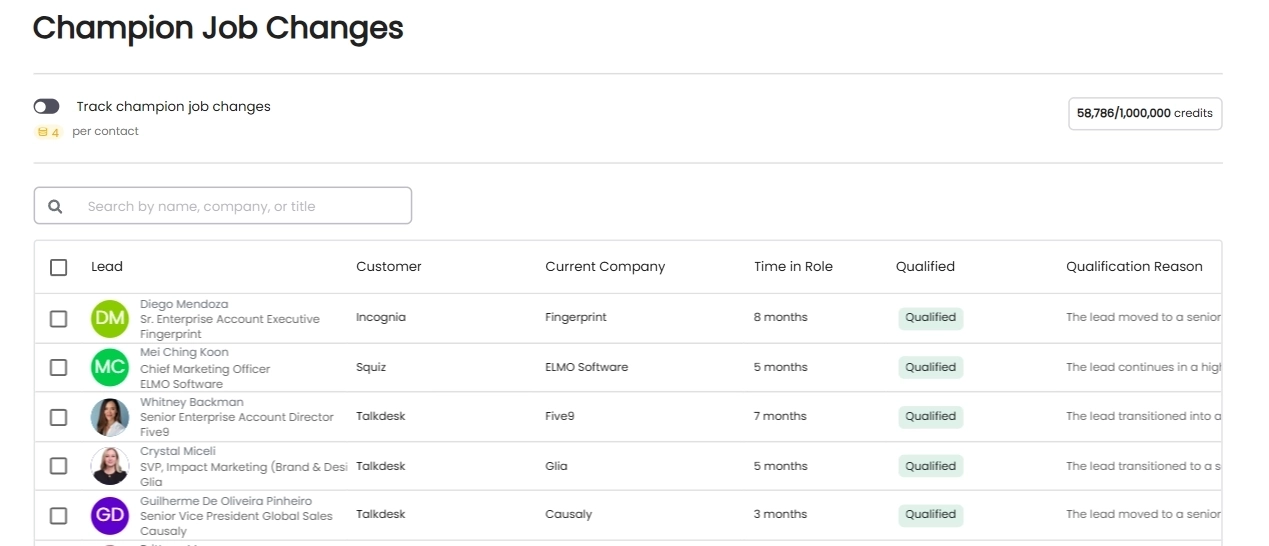
Automatic champion job change tracking
When a signal fires, Letterdrop alerts the right rep with full context: who the champion is, what they championed, where the relationship came from, and what just changed. If nothing has changed, no alert fires.
The custom fields in this guide give your reps a way to record champion relationships. Letterdrop gives them a way to act on those relationships at the moment they matter most.
Subscribe to newsletter
No-BS GTM strategies to build more pipeline in your inbox every week
Related Reading
Some other posts you might find helpful